
One client domain is easy to remember. Thirty are not. Add hosting, SSL certificates and plugin licenses, and an agency can easily carry a hundred deadlines scattered across registrars, inboxes and old spreadsheets.
Most expired domains are not caused by negligence. They happen because the reminder went to a former employee's mailbox, the card on file expired, or nobody was sure who was supposed to renew it. This guide covers what to track, how to track it, and when to alert.
Why domain lapses keep happening
The usual causes are boring:
- Reminders go to the wrong person. The registrar emails the address from 2019, not the project manager.
- Auto-renew fails silently. The card expired, the bank blocked the payment, or the registrar account was closed.
- Nobody owns the domain. The client thinks the agency handles it. The agency thinks the client does.
- Domains live in many accounts. Some in your registrar account, some in the client's, some with a previous developer.
A tracking process fixes the second half of each of these: it makes the deadline visible no matter who holds the account.
What to record for every domain
The expiry date alone is not enough. For each domain, keep:
- Domain name and registrar
- Expiry date (check it against WHOIS/RDAP, not only your own notes)
- Registrant and account owner: the client or the agency
- Auto-renew status and the payment method behind it
- Who pays and who invoices
- Where DNS is hosted, since it is often a different provider
- Linked assets: the site, hosting plan and SSL certificate that depend on this domain
Item 3 matters most. If you do not know whose account the domain sits in, you do not know who can actually renew it.
Five ways to track expiry dates
1. Registrar dashboards. Fine for one registrar. Useless once clients use different ones, and you cannot see domains in accounts you have no login for.
2. Calendar events. Quick to set up and easy to forget to maintain. Calendars do not tell you which domains have no event at all.
3. A spreadsheet. The most common agency solution, and a reasonable start. It works until the sheet stops being updated. We cover where it breaks in spreadsheet vs dedicated tracker.
4. WHOIS/RDAP lookups. Useful for verification, because the registry is the source of truth for the expiry date. Manual checks do not scale, but scripted checks do.
5. A dedicated renewal tracker. A tool that stores the domains, reads expiry data, and sends alerts to the right people. This is what Duvento does for domains, SSL, hosting and licenses in one place.
Whatever you choose, the test is simple: if you left for two weeks, would the deadlines still reach someone?
Set alert thresholds that match reality
A single reminder one week before expiry is too late. Renewals can be blocked by payment issues, approval delays or a client who is on holiday. A workable schedule:
| Days before expiry | Action |
|---|---|
| 60 | Confirm the domain is still needed, check owner and payment method |
| 30 | Send the renewal quote or invoice to the client |
| 14 | Escalate if unpaid or unapproved |
| 7 | Renew manually if needed, do not wait for auto-renew |
| 1 | Final check, confirm the new expiry date |
Send alerts to a shared mailbox or channel, not to one person.
Watch for these traps
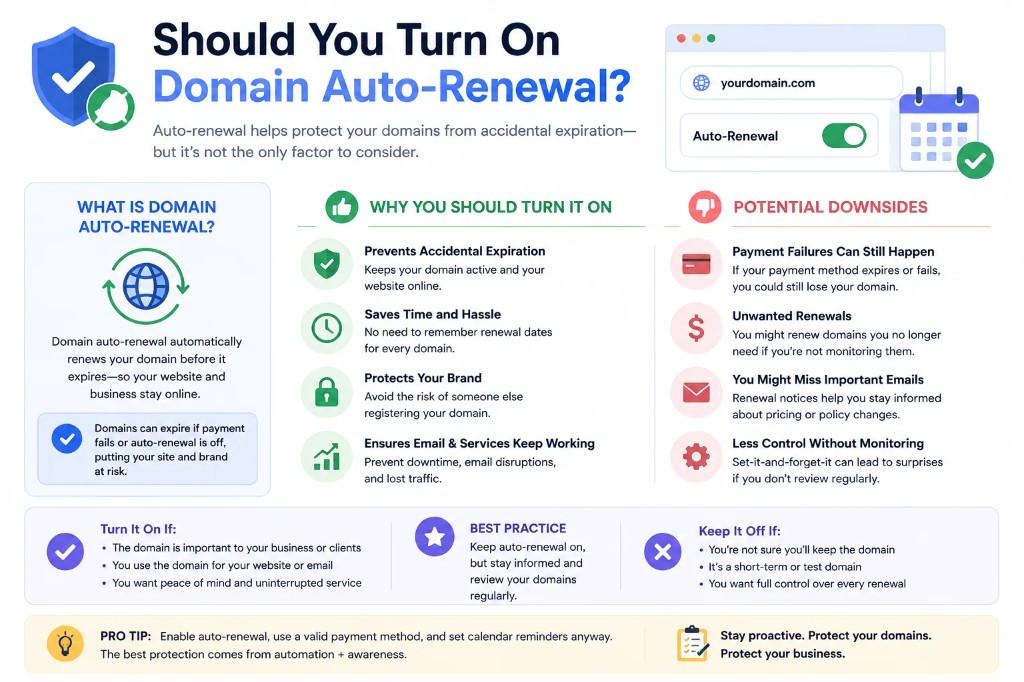
- Auto-renew is not a guarantee. Treat it as a convenience, then verify the new date after each renewal cycle.
- ccTLDs behave differently. Grace periods, renewal windows and restoration rules vary by registry, so read the rules for each extension you manage.
- Renewal prices differ from first-year prices. A cheap registration can renew at several times the price, which surprises clients.
- Domain changes affect more than the site. Email, subdomains and SSL all stop working when a domain lapses. See what happens when a domain expires.
A simple starting process
- List every client domain, including the ones you think are someone else's problem.
- Confirm the registrant and account owner for each.
- Add expiry dates from WHOIS/RDAP, not from memory.
- Set the 60/30/14/7/1 reminders to a shared address.
- Review the list monthly for 15 minutes.
For a fuller process, use the domain renewal checklist for web agencies.

How to track domain expiration dates without a second job
A list you can open on Monday and trust is the whole job. Every domain the agency is responsible for is on it, the date matches the registry, and the reminder does not sit in one person's inbox. That is what "how to track domain expiration dates" means once you have more than a handful of clients.
Build the list in one pass. Export what you can from registrars you control. For a domain in a client account, ask for the expiry date and the account email, or run RDAP yourself. A missing row is worse than a slightly stale note.
Assign each row a person, not a team name. "Ops" is how reminders die. That person does not have to pay the registrar. They have to notice the alert and move the renewal, the invoice, or the client question.
Review on a fixed day. Fifteen minutes is enough when the data is clean. Look for dates inside 60 days with no action, auto-renew that failed last cycle, and domains whose account owner you still cannot name.
When a domain renews, write the new expiry the same day. A successful renewal that never gets recorded makes the next reminder fire against an old date, and then everyone stops trusting the list.
Keep DNS and email on the same row. A lapsed name takes mail, password resets and API callbacks down before the parked page is obvious to the client.
If you bill renewals separately, pair the date with an invoice path. A date with no way to get paid still gets missed, only later, and the conversation is worse. Pricing for a tracker is cheaper than one redemption fee; the pricing page is the comparison, not a substitute for the list.
Field notes from agencies that stopped missing names
The agencies that stay out of trouble do not have a clever system. They have a boring one. New domains go into the tracker before DNS is pointed at the new host. Old domains stay on the list until the client confirms, in writing, that the name can drop. "I think they do not use it" is not a confirmation.
WHOIS privacy does not remove the expiry date at most gTLD registries. RDAP is the lookup to script. For ccTLDs that hide the date, the registrar invoice is the source, and you should still store the date yourself. A blank cell is a defect, not a mystery.
Separate "we renew it" from "we remind them". Both belong on the row. Mixing them is how an agency assumes auto-renew is on in an account it cannot see.
Once a quarter, pick five random rows and check them against the registry. If two are wrong, the list is decoration. Fix the process before you add another column.
That audit is also when you catch domains registered by a contractor who has since left. Move the contact email the same week. A reminder sent to a dead mailbox is the same as no reminder.
FAQ
How do I find out when a domain expires?
Run a WHOIS or RDAP lookup and read the registry expiry date. Some ccTLDs hide it, in which case you need access to the registrar account.
Is auto-renew enough?
No. Cards expire, payments fail and accounts get locked. Keep independent reminders as a backup.
How many days before expiry should I renew?
Start the process 30 to 60 days ahead, and renew at least a week before the date.
*Duvento tracks domains, SSL certificates, hosting and licenses in one dashboard and alerts your team before anything lapses. See how it works.*